As someone who’s been deep in the fiber splitter game for years—helping ISPs, network installers, and small business ops get the right gear for their builds—I get it. When you’re mapping out a fiber network, the terms “splicing a fiber splitter” and “connectorizing a fiber splitter” sound like they might be interchangeable, right? Don’t get me wrong, both are core parts of getting a splitter set up so your signal doesn’t drop, but they’re totally different processes, each with their own use cases, pros, and pitfalls. Let me break this down like I would over a coffee with a customer who’s just staring at a pallet of splitters and wondering which route to take. Fiber Splitter

First, let’s start with the basics: what’s a fiber splitter, anyway? If you’re not 100% up, it’s the thing that splits one incoming fiber signal into multiple outgoing signals—usually 1×4, 1×8, 1×16, even 1×32 for bigger networks. Think of it like a traffic divider for light: instead of one lane of data, you get four, eight, or 32 lanes, all carrying the same signal to different locations. Now, splicing vs. connectorizing: both tie the fiber cables to the splitter, but here’s where the line gets fuzzy for a lot of folks.
Splicing a fiber splitter is all about fusing two fiber ends together permanently—no detachable parts, no clips, no quick pulls. When we’re talking splitter-specific splicing, that’s almost always fusion splicing: you take the bare fiber from your main trunk cable, strip off the protective coating, clean the core, and then heat it so it melts and merges seamlessly with the bare pigtail fiber that’s pre-attached to the splitter. Wait, pigtails—yeah, that’s key here. Most splitters come with pigtails (short, bare fiber ends) on the input and output ports, so splicing is fusing your field cable to those pigtails. There’s also mechanical splicing, which uses a tiny sleeve and adhesive to align the fibers without heat, but fusion is way more common for splitters because it has a way lower signal loss.
Let’s paint a real scenario: say you’re running a new FTTH (fiber to the home) network in a rural area. You’ve got a 12-strand trunk cable coming from your neighborhood node, and you’re using a bunch of 1×8 splitters to feed 8 homes each. The splitters are mounted in pedestal boxes out by the street. If you splice here, you’d take the bare end of your trunk fiber, splice it to the splitter’s input pigtail, then the splitter’s output pigtails get spliced to the drop fibers that run to each house. Why would you go this route? First, permanent connections mean almost no signal leakage. Every time you have a joint, there’s a tiny chance light escapes—splicing cuts that to like 0.1 dB per splice, which is basically unnoticeable for most networks. It’s way more durable too, especially in harsh environments: if it’s raining, snowing, or the pedestal gets jostled by a tree branch, a fused splice won’t come loose. No one wants a technician driving an hour out to replace a loose connector because a raccoon knocked a box.
But let’s flip that to connectorizing. Connectorizing is when you attach a detachable connector (like an SC, LC, or UPC connector) to your fiber end, then plug it straight into the splitter’s port. Wait, some splitters do come with pre-terminated connectors, but connectorizing can also mean putting connectors on your field cables to mate with the splitter. So instead of fusing bare fiber to pigtails, you crimp or epoxy a connector onto your cable’s end, then snap it into a port on the splitter (or into a adapter that’s already on the splitter). For example, if you’re using a 1×4 splitter mounted inside a small office’s network closet, you might take your LC-terminated patch cord, line it up with the splitter’s pre-installed LC adapter, and click it in. No special splicing tools needed—just a connector crimper, a cleaver, and a little practice.
Another scenario for connectorizing: a small business that’s upgrading their existing fiber network. They don’t want to dig up the sidewalk to run new permanent splices, so they’re just adding a few extra ports to their existing splitter. They can grab a pre-made patch cord with a connector on one end, plug it into the splitter, and be done in 10 minutes, no heavy tools required. That’s a huge win for speed, right? Splicing takes like 2 minutes per splice, but you’ve got to haul a fusion splicer, a cleaver, a power source for the splicer, and protective gear to a job site. Connectorizing is way faster for small, indoor, or temporary setups.
Now, let’s get into the differences that actually matter for a network builder. First, durability and environment: splicing is the winner for outdoor, harsh, or long-term deployments. A fused splice is solid—no moving parts, no risk of it popping out from vibration or weather. Connectorized connections, though, have a tiny gap between the fiber end and the splitter’s port, even when mated. That gap can let in dust, moisture, or debris over time, which adds signal loss (usually around 0.5 dB per connector, sometimes more if the connector gets dirty). For a network where every dB counts, that extra loss can add up if you have a lot of connectors—say, 32 connectors on a splitter, that’s 16 dB of loss, which is way too much for a signal to work.
Then there’s scalability and flexibility. Connectorizing is way easier if you think you’ll need to rearrange your network down the line. Let’s say you used a 1×16 splitter, but after 6 months, you only need 10 of the 16 ports—you can just unplug the two unused connectors and use them somewhere else, no need to re-splice anything. Splicing is permanent, so if you mess up a splice, or if you need to move a port, you have to cut the fiber, strip it, and re-splice, which is a total hassle. I’ve had customers call me in a panic because they spliced a fiber to the wrong port on the splitter, and now they have to dig up 50 feet of cable to fix it—way more expensive than just unplugging a wrong connector.
Wait, cost—let’s talk numbers, because that’s a big one. Fusion splicing equipment isn’t cheap. A good fusion splicer runs $2,000 to $5,000, plus you need a cleaver (another $200-$500), tools to strip fiber, and protective cases. If you’re a small installer who only does one or two splitter jobs a month, that’s a huge upfront cost. Connectorizing, though, you can buy a basic connector termination kit for like $100, and pre-terminated patch cords are way cheaper to buy than spliced custom cables. That said, when you’re doing a big job—like a 1,000-home FTTH build where you need 20 splitters—splicing ends up being cheaper per connection. Connectors add up: each connector is $5 to $15, and for 32 ports, that’s $160-$480 just in connectors, versus splicing which costs like $2 per splice (for materials, not tools) so 32 splices would be $64. That’s a big difference for large-scale deployments.
Signal loss is another key point. Let’s make this concrete: a fused splice between two singlemode fibers has a typical insertion loss of 0.05 to 0.1 dB. A mated LC connector pair (connector on the cable, adapter on the splitter) has a loss of 0.2 to 0.5 dB. If your budgeted total signal loss for a splitter is like 3 dB (including the splitter’s own 3.5 dB loss, wait no—1×8 splitter is like 9 dB loss? Wait, no, let me get that right: a 1×8 fused splitter has a typical insertion loss of around 7.5 to 8.5 dB. So if you add connector loss, that’s 0.5 dB per connector, so input and output connections add 1 dB, total 9.5 dB, which is still okay. But if you have 16 connectors, that’s 8 dB, so total loss would be 8 + 8 = 16 dB, which is way over the threshold for most lasers to work. Splicing, though, adds almost no extra loss, so even a 1×32 splitter with 64 splices (32 input, 32 output) would only add like 3.2 dB total, which is totally fine.
But wait, there’s a middle ground here, right? A lot of splitters now come with pre-terminated connectors—so they’re pre-connectorized at the factory, not at the job site. That’s a happy medium: you get the durability of a factory connection (the connector is aligned perfectly in a clean factory, so less loss) and the flexibility to unplug if needed. Wait, but even that’s different from on-site connectorizing. Pre-terminated is factory done, on-site is you doing it yourself.
Let’s also clear up a common misconception: some folks think splicing is only for big fiber jobs, but no—you can splice a splitter indoors too, if you want a permanent setup. I had a customer last year who was running a fiber network in a data center, and he didn’t want any loose connectors because of EMI (electromagnetic interference) or accidental disconnections from server moves. He opted for splicing all his splitters, and his team loved it because there were zero downtime issues after setup.
Another thing to consider is skill level. Fusion splicing requires training—you can’t just pick up a splicer and do it right. You have to be able to strip the fiber without nicking the core, cleave it perfectly so the ends are flat, align them just right in the splicer, and heat it without burning the coating. A bad splice is worse than no splice—it can cause high loss, signal reflection, or even break the fiber. Connectorizing, though, is way more beginner-friendly. A lot of pre-made connector kits come with easy-termination tips, and even if you mess up, you just cut the connector off and try again, no wasted fiber or messy splices. I’ve trained new installers to do connectorizing in an hour, but it takes 8 hours to get decent at fusion splicing.
So when should you pick which one? Let’s make a quick cheat sheet:
- Go with splicing if: it’s an outdoor, permanent, large-scale deployment (FTTH, campus networks, remote pedestal boxes), you’re on a tight budget for a big job, and you want the most reliable, low-loss connection possible.
- Go with connectorizing if: it’s an indoor, small, or temporary setup (office LAN, pop-up events, small business upgrades), you need flexibility to rearrange ports later, or you don’t want to invest in expensive splicing tools.
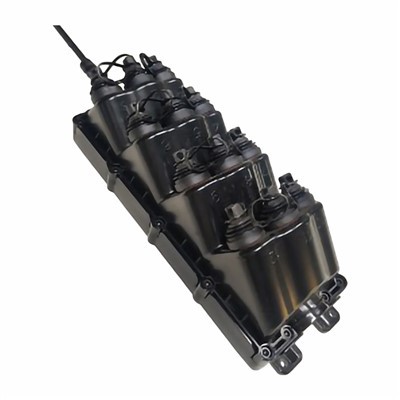
Wait, but what about when you’re working with a fiber splitter specifically—does that change anything? Let’s say you have a block splitter (the kind that’s a single module with pigtails) vs. a rack-mount splitter. For block splitters, splicing to the pigtails is standard, because they’re usually outdoor units with pigtails meant for splicing. For rack-mount splitters that go in network closets, a lot of people prefer connectorizing because they’re plug-and-play, and you can swap a splitter out without splicing every time. That makes total sense—if you’re in a closet, you don’t want to have to pull a splicer every time a splitter goes bad.
I’ve seen so many customers make the wrong call here, too. Last quarter, a small ISP came to me with a job for 100 1×8 splitters, and they opted for connectorizing because they thought it would be faster. Turns out, they had to send a technician to each pedestal to install connectors, half of them broke because the technician wasn’t trained, and they ended up with a 15% higher signal loss than they budgeted, so they had to re-do 30 of them with splicing. Total waste of time and money. That’s why I always ask customers to walk me through their build—no matter how small—because I can help them pick the right approach.
Another point: maintenance. If you splice a fiber splitter, you’re never going to have to clean a connector. Spliced connections are sealed inside splice trays, so dust and moisture can’t get to them. Connectorized connections, though, need regular cleaning—you have to blow out dust from the connector ends with air, or use a special cleaning swab, because even a tiny spec of dust can add 1 dB of loss, which is enough to make a signal drop for a home’s internet. For outdoor splitters, that’s a nightmare—you can’t climb a pedestal every 6 months to clean connectors, so splicing is way easier for long-term maintenance.
Let’s also talk about future-proofing. Fiber networks are always evolving—you might start with 1 Gbps, then upgrade to 10 G, then 100 G. Spliced connections are way more stable for high-speed signals because there’s no gap between fibers that can cause back reflection (light bouncing back from the splice, which can mess with high-speed lasers). Connectorized connections can work, but they’re more prone to back reflection over time, especially if the connector gets dirty or worn. So if you’re building a network that you expect to scale to 10 G or higher, splicing is the safer bet long-term.
Wait, but I don’t want to make it sound like connectorizing is bad. It’s perfect for a lot of use cases. For example, if you’re setting up a temporary network for a construction site, and you need a splitter that you can move in a week, connectorizing is way better. You can just unplug the splitter, pack it up, and take it to the next site, no tools needed. Splicing would mean leaving a permanent fiber, which you don’t want to do on a temporary job.
So to wrap this up, the core difference isn’t just “permanent vs. detachable”—it’s the whole package: durability, cost, speed, flexibility, and use case. Splicing a fiber splitter is for when you need a reliable, low-loss, long-lasting connection, usually outdoors or for big-scale builds. Connectorizing is for when you need speed, flexibility, or a plug-and-play setup, usually indoors or small jobs.
If you’re still not sure which one is right for your project, I’m here to help. I’ve been supplying fiber splitters for over a decade, so I can walk you through the specs, recommend the right splitter for your needs, and even give tips on tools or installation. Whether you’re a small installer doing your first FTTH job, or a big ISP mapping out a city-wide network, hit me up to chat through your requirements. No pressure, no confusing jargon—just straight talk about what will work best for you.
Fiber Optic Attenuator References:
- Corning Optical Communications. (2021). Fiber Splicing Basics: Fusion vs. Mechanical. Corning Inc.
- Telecommunications Industry Association. (2020). TIA-568-C.3 Standard for Fiber Optic Cabling. TIA.
- FTTH Council. (2022). FTTH Network Deployment Best Practices. FTTH Council Americas.
- AFL. (2023). Fiber Splitter Installation Guide. AFL Telecommunications.
- Optical Society of America. (2021). Insertion Loss in Fiber Optic Connections. OSA.
Brolink Technologies (Dongguan) Co., Ltd.
As one of the most experienced fiber splitter manufacturers and suppliers in China, we offer a wide range of products with superior quality. We warmly welcome you to buy high-grade fiber splitter in stock here and get quotation from our factory. For price consultation, contact us.
Address: Room 201, Unit 2, Building 16, 77 Dongguan Science And Technology Park, Shilong Road, Guanlong Road, Dongcheng District,Guangdong province,China
E-mail: scwang@brolinktech.com
WebSite: https://www.brolinkopt.com/
